
The Help Submenu will be displayed if you press  /
/ or point at the Help option on the main menu and press the left mouse key. The help submenu looks like this:
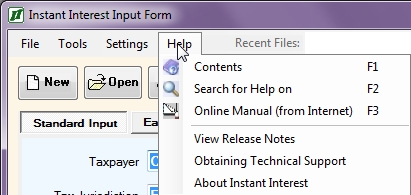
The Help Submenu can be used to get help with Instant Interest in several ways:
Contents Invokes the main Instant Interest help system starting from the Table of Contents. Search for Help On Invokes the main Instant Interest help system starting from the topical search prompt. Online Manual (from Internet) Accesses the Instant Interest manual from the C&C Software Web site. Obtaining Technical Support Gives you information on how to contact C&C Software for assistance with questions regarding Instant Interest. About Instant Interest Gives you basic information about the Instant Interest program.
You can also access the Help system by pressing the  key at any time during the execution Instant Interest or by selecting the Instant Interest Help icon from the Instant Interest program group.
Contents
The Contents option on the Help Submenu invokes the main Instant Interest help system starting from the Table of Contents.
Search for Help On
The Search for Help On option on the Help Submenu invokes the main Instant Interest help system starting from the topical search prompt.
Online Manual (from Internet)
The Online Manual (from Internet) option on the Help Submenu accesses the Instant Interest online manual from the C&C Software Web site. If your default Web browser is not already loaded, Instant Interest will launch it. In any case, Instant Interest will transfer control to the browser and load the table of contents page of the manual.
Obtaining Technical Support
The Obtaining Technical Support option on the Help Submenu gives you information on how to contact C&C Software for assistance with questions regarding Instant Interest.
About Instant Interest
The About Instant Interest option on the Help Submenu gives you basic information about the Instant Interest program.