
Use the Add Interest Rate Form to input the parameters needed (rates and calculation methods) for Tax Jurisdictions defined to Instant Interest.
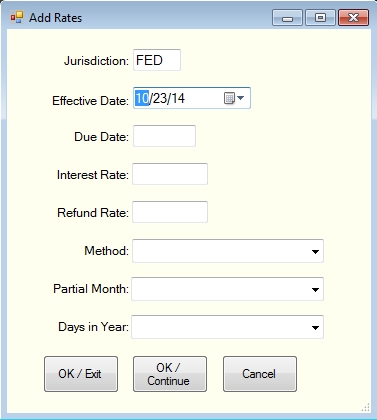
The Add Interest Rate Form consists of the following input fields:
- Jurisdiction ID – this is a non-modifiable field which corresponds to the currently selected jurisdiction (see note below);
- Effective Date – the date on which the combination of rates and calculation methods became effective;
- Due Date – the date on which tax returns are due for taxpayers whose fiscal year coincides with the calendar year;
- Interest Rate – the rate for calculating interest on underpayments;
- Refund Rate – the rate for calculating interest on overpayments;
- Method – the calculation method (i.e., simple interest or method of compounding) used for calculating interest;
- Basis – the basis of calculating the period of time for which interest is due if it is other than calendar days; and
- Days in Year – the number of days treated as a calendar year if it is not the same as the number of days actually in the calendar year.
The key of the records in the rate file is a combination of Jurisdiction ID and Effective Date. All of the other fields contain the corresponding values for the selected jurisdiction as of the Effective Date. In order to add rates for a jurisdiction which is not maintained in the Instant Interest rate file by C&C Software, you must first add the Jurisdiction using the "Add Jurisdiction" panel to set up the jurisdiction and then use the "Add Rate" panel to add rate records.
Method, Basis and Days in Year have a defined set of values with particular meanings.
Possible values for Method are:
SIM – Simple Interest DAI – Daily Compounding MON – Monthly Compounding QTR – Quarterly Compounding ANN – Annual Compounding
The values for Basis are:
M/D – partial years are calculated as the number of whole months plus the number of days in a partial month; or blank – partial years are calculated as the number of days divided by the number of days in the year.
The values for Days in Year are:
360 – taxes for partial periods are calculated based on having 360 days in the year rather than the number of days (365 or 366) actually in the year; or blank –
The Add Rate panel also includes four buttons which function as follows:
Pick – Appears to the right of the Effective Date field and displays the Calendar panel to allow you to pick the Effective Date from a calendar. OK / Exit – Edits the values and if they are valid adds them to the worksheet in the lower portion of the Rate Maintenance panel and returns to that panel. OK / Continue – Edits the values and if they are valid adds them to the worksheet in the lower portion of the Rate Maintenance panel but keeps the Add Rate panel displayed so that you can enter more rates. Cancel – Abandons the Add Rate operation and returns to the Rate Maintenance panel.