
The Easy Calculation tab is accessed by clicking on the second tab and appears as follows:
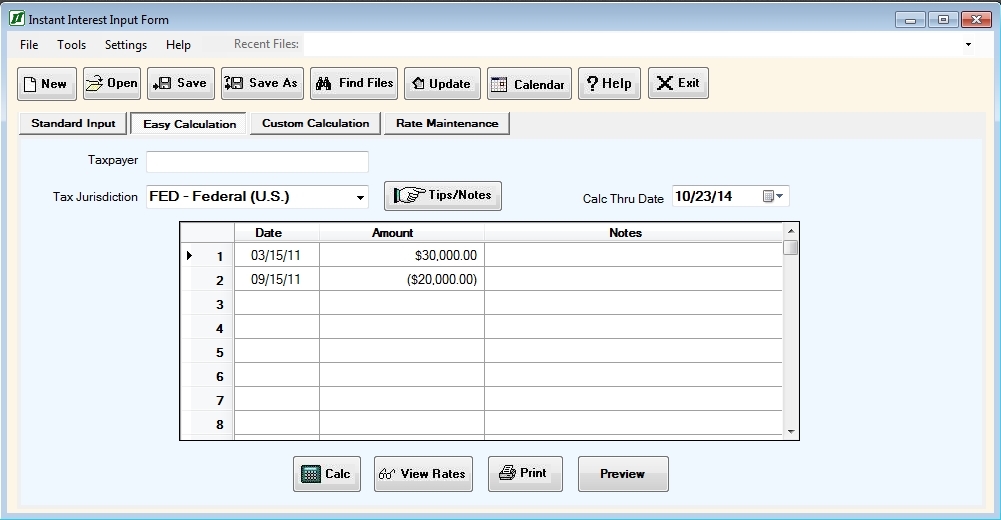
The input areas consist of three fields and one table. The three fields are as follows:
Taxpayer is a comment only field (that is, it has no effect on the calculations) that can be used to document the taxpayer for the interest schedule. This is useful for worksheets which are saved for reuse later or printed.
Tax Jurisdiction is the tax jurisdiction for which interest is being calculated. The tax jurisdiction can be selected from a list by clicking on the down arrow at the right of the input field. You can also enter the tax jurisdiction by keying in the appropriate abbreviation. In most cases the abbreviation for a tax jurisdiction is the standard two letter abbreviation for a state and its name, but it may be FED – Federal, DC – District of Columbia, NYC – New York City, or another jurisdiction which you have added. Note: Because NYC is used for New York City, NYS is the abbreviation for New York State.Thru Date is the date (in MM/DD/YY format) through which the interest is to be calculated.
The Easy Calculation table can be used to enter either positive or negative amounts for any date. Positive amounts indicate amounts due, including additional assessments.
Negative amounts can be used to indicate payments made. In the example above, there is a $100,000 amount due on 3/15/91, a $30,000 payment made on 7/15/92, and an additional assessment of $25,000 on 8/13/93.
The Easy Calculation table has five columns:
- A line number;
- A Del(ete) button;
- Date is the date from which to calculate the amount due/payment made;
- Amount is the dollar value of the amount due/payment made; and
- The Notes field can be used to annotate the amount due/payment made.
The Delete button is used to delete a line from the table. When you point at the Delete button and click on it, you will receive a prompt asking you if you really want to delete that line (provided there is data on that line).
The Easy Calculation tab also has five command buttons, as follows:
The Tips/Notes button is used to look up any unique tips or notes regarding calculating interest for the Tax Jurisdiction in the Instant Interest help system. It appears as active (text in black) if there are notes and inactive (text in grey) if there are not.
The Calculate button is used to generate and display an interest schedule based on the values in the current worksheet.
The Pick button is used to select the Thru Date from a calendar instead of entering it directly.
The View Rates button is used to display the interest rates, due dates, and calculation methods stored in the Instant Interest rate file for the current tax jurisdiction.
The Print button is used to generate and print an interest schedule based on the values in the current worksheet.
The command buttons that appear above the Easy Calculation tab ("New", "Open", etc.) are common to all four of the basic input forms and are described under Common Input Form Buttons.