
In planning an installation of Instant Interest, you should first decide what approach fits your users needs.
- If you anticipate the possibility that you may have multiple users that will use Instant Interest while connected to a LAN, you should install the Instant Interest to run from a network server. This installation method has the big advantage that when you apply a quarterly update, all of the users will immediately have the latest versions of the program, help, and rate files.
- If you anticipate that you will never have more than one user or if your users will need to use Instant Interest while not connected to your LAN, you can perform a standalone installation.
If you end up installing the application in multiple locations, you will need to apply the quarterly update to each location separately. For this reason, we recommend perform an installation to a network server and then set up users to launch the application from that server.
See www.candcsoftware.com/tutorial1.htm for an interactive tutorial concerning installation options.
Standalone Installation
In a standalone installation, Instant Interest is installed to a workstation from either a CD or an installation package download from the Internet.

Network Installation
Installing Instant Interest to run from a network file server is a two-step process.
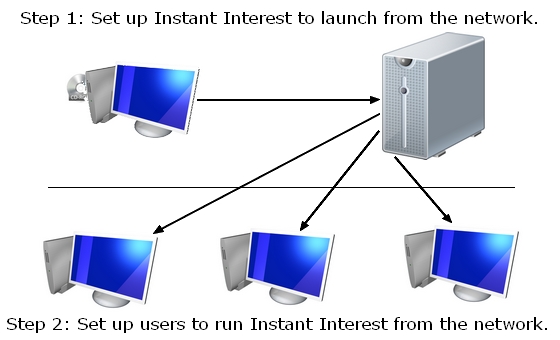
- In the first step, the application is set up on the server.
- In the second step, a workstation is set up to launch the application from the server. This step must be performed for each workstation that will use the application.
Important Note Regarding Security Authorizations
The installation program adds/updates files in various locations. These are documented in the Appendix of this manual along with descriptions of the files. The person performing the installation, either to the network server or to a workstation, must have the appropriate security authorizations. Otherwise, the installation will fail. The specific instructions for each installation scenario describes the security authorization requirements.
It is also important that the security authorizations be set up correctly for users of the application and for the person applying quarterly updates:
- Instant Interest allows users to add their own jurisdictions and make changes to the rate table. For this reason, the rate file is opened in read/write mode. This means that users must have the ability to update the rate file (corp_inc.mdb). For that reason, we recommend that the rate file be put in a separate directory.
- The person updating the application must have read/create/write/modify/delete rights to the directory holding the program, help, and rate files (ii32.exe, ii32.hlp, and corp_inc.mdb, respectively).